- Help
- Using the dashboard
- Overview and progress
Overview and progress
Your project's home page. How far along it is, what we need from you, what's changed lately, and your most-used links.
When you sign in you land on your project's Overview. You can always get back to it by choosing Overview at the top of the left-hand menu.
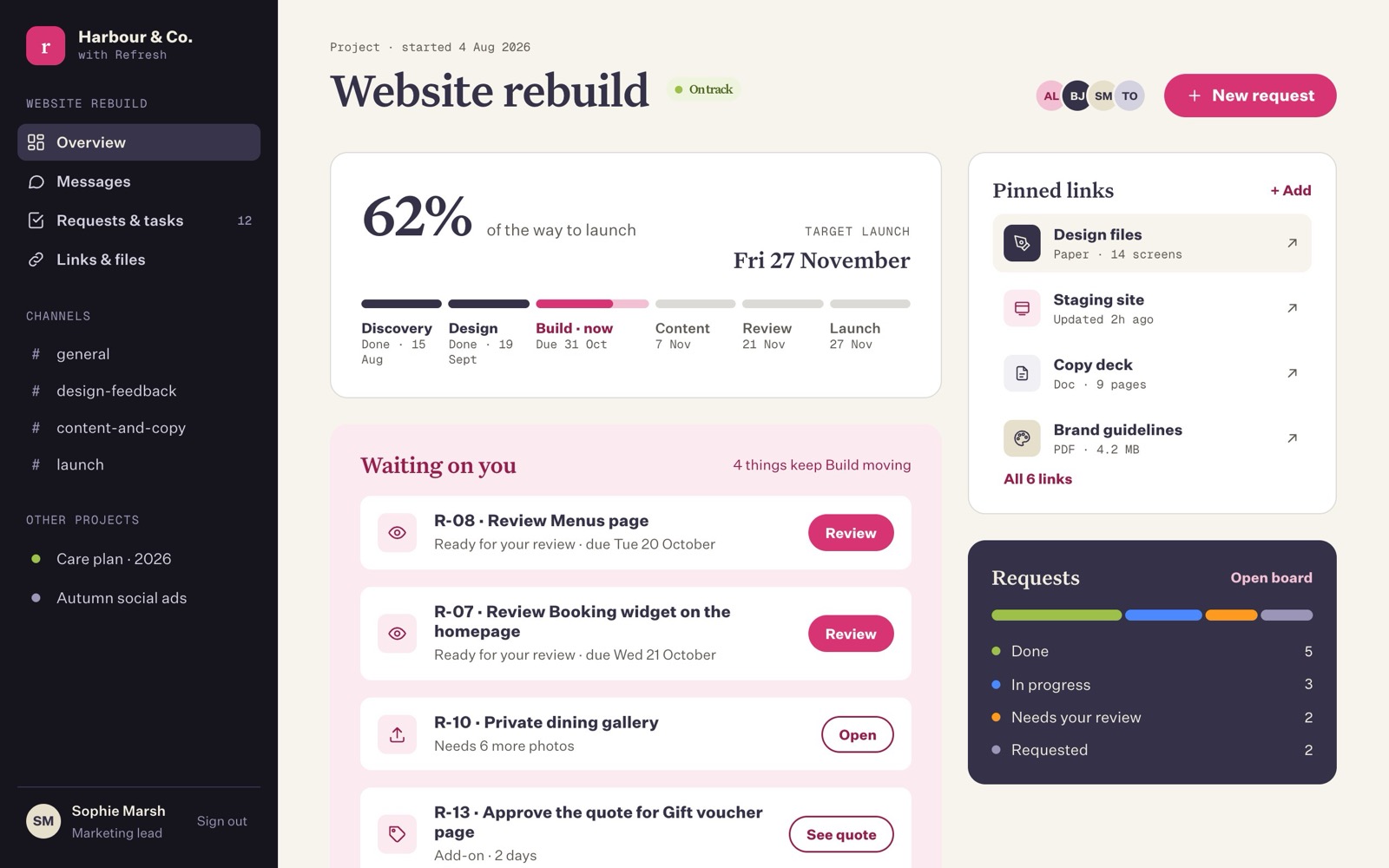
The top of the page
- When it started, the project's name, and a coloured label showing how it's going: On track, At risk, Paused or Done. "At risk" usually means something is holding things up. We'll explain why in Messages.
- The faces on the right are the people on your project, from your side and ours. See People.
- New request lets you ask for something from any page. See Requests and tasks.
Progress to launch
The large figure, for example 62% of the way to launch, is our best measure of how far along your project is. Next to it is the target launch date, if one has been set.
Underneath, each phase of the project is listed in order, for example Discovery, Design, Build, Content, Review and Launch:
- A finished phase says Done with the date it finished.
- The phase we're working on now is marked now, with a bar showing how far through it we are and the date it's due.
- Later phases show the date they're planned for.
How the percentage is worked out
Not every phase is the same size. Build usually takes far longer than Launch, so each phase counts for a share of the whole (we call this its weight). A typical website build splits like this:
| Phase | Share of the whole |
|---|---|
| Discovery | 10% |
| Design | 25% |
| Build | 40% |
| Content | 10% |
| Review | 10% |
| Launch | 5% |
So if Discovery and Design are done and Build is 68% of the way through, the project is 10 + 25 + (40 × 0.68) = about 62% of the way to launch. The Refresh team updates these figures as work moves on, so the number reflects our judgement, not a stopwatch.
Waiting on you
This is the most useful part of the page. It lists everything we can't move forward without you, with the soonest due first:
| What you'll see | What it means | Button |
|---|---|---|
| Review (name of the work) | Something is ready for you to look over. | Review |
| Approve the quote for (name) | We've priced something that's outside the original plan. | See quote |
| A request with a note such as "Needs 6 more photos" | We're stuck until we get something from you. | Open |
When the list is empty it says "Nothing right now. We'll let you know here when we need you."
Above the list you might see a line like "2 things keep Build moving". That's a gentle reminder that the current phase depends on them.
Latest updates
A short history of what's happened recently, newest first: who asked for what, who approved what, which links were pinned, and when the plan was updated. It shows the last eight things.
Pinned links and the requests summary
On the right (or further down on a phone):
- Pinned links shows the first four links for the project, such as the staging site (the private test copy of your new website) and design files. Press + Add to pin one, or All links to see the rest. See Pinned links and files.
- Requests shows a coloured bar and counts: Done, In progress, Needs your review and Requested. Press Open board to see them all.
More than one project?
If you're working with us on more than one thing, your other projects are listed under Other projects at the bottom of the left-hand menu, each with a coloured dot (green for on track, orange for at risk, grey otherwise). You can also press ⌘ K (or Ctrl K) and type a project's name to jump to it.
Last updated on 18 October 2026